
One-Button Clipping & Custom Lengths
Press T while watching to mark a touch automatically, then tune any clip between 0.5s and 30s right in the workspace or share editor.
 15-DAY FREE TRIAL · NO INSTALL · SOCCER & BASKETBALL
Open full-match video directly in Chrome, Safari, or Edge on Mac, Windows, Chromebook, or iPad—no 4 GB uploads needed. Press T whenever your player touches the ball to cut custom 0.5s–30s clips, lock on an AI perspective-scaled spotlight ring, mute sideline chatter by default, and share universal highlight links in seconds.
0.5s–30s—no huge uploads required.
Press T while watching to mark a touch automatically, then tune any clip between 0.5s and 30s right in the workspace or share editor.
Click your player's feet once to lock on an auto-tracking ring that follows motion smoothly and grows or shrinks with perspective across the clip.
Switch seamlessly between dedicated soccer actions & technical moves and full basketball stat tagging under one account.
Full match footage streams straight from disk in your browser, and shared MP4s mute sideline audio by default to protect family & player privacy.
Every confirmed clip updates season shooting, passing, duels, dribbles, and scout reports organized by player across every match.
Send clean 1080p MP4 links to grandparents, coaches, or phones from any device with optional 2 GB cross-device cloud clip sync on Pro plans.
Real workspace, tagging, crop & spotlight tracking, scout report, and career stat screens — click any image to zoom.
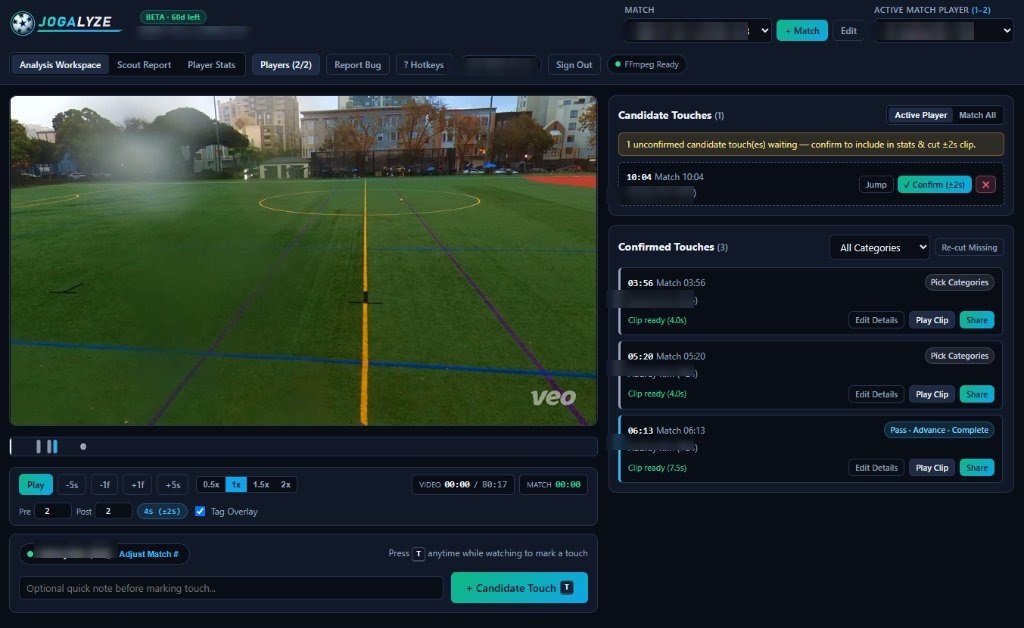
T), customizable clip lengths, and live tag overlays.
Start free in seconds with Google, Facebook, or email — no credit card required.
0.5s–30s clips + universal share linksRunning a full club roster or want early invites to automated full-match touch detection? Drop your email below—zero spam, just launch & team plan updates.